



How To Use InterLink Payments: QR & Crypto Payment Guide
Sep 25, 2026
Technology
InterLink QR Payment allows users to make real-world payments using crypto. Through ITLX Pay, you can pay bills, shop, or transfer crypto via quick QR code scanning. This guide explains how to use InterLink payments.
Important Note: InterLink's payment infrastructure is powered through partnerships with third-party providers. This means payment availability depends on the partner's supported regions and may not be accessible in all countries. InterLink does not operate its own payment rails directly.
What Is InterLink QR Payment?
InterLink QR Payment is a payment feature designed to connect digital assets with everyday transactions. Through ITLX Pay inside the ITLX Wallet, users can scan a supported merchant QR code and complete a payment using their available digital asset balance.
The main idea is simple: users pay with crypto, while the merchant can receive payment in local fiat currency where the relevant payment service is supported. This reduces the need for users to manually exchange their crypto or move funds through a separate off-ramp before making a purchase.
How the Payment Experience Works
The experience is designed to be similar to familiar mobile payment methods. Instead of entering long wallet addresses or manually handling a crypto conversion, users can scan a QR code, check the payment details, and confirm the transaction. The crypto-to-fiat conversion is handled as part of the payment process, so the merchant receives local currency while the user pays from their supported digital asset balance.
The Role of ITL in Payments
ITL is the primary payment and settlement token designed for external transactions, liquidity provision, and merchant payments across the InterLink ecosystem. While supported payment options can include assets such as USDT, USDC, and Ethereum, ITL serves as the universal settlement and reserve asset of InterLink Chain. This means that every payment routed through InterLink's infrastructure is designed to flow through ITL at the settlement layer.
How to Make QR Code Payments
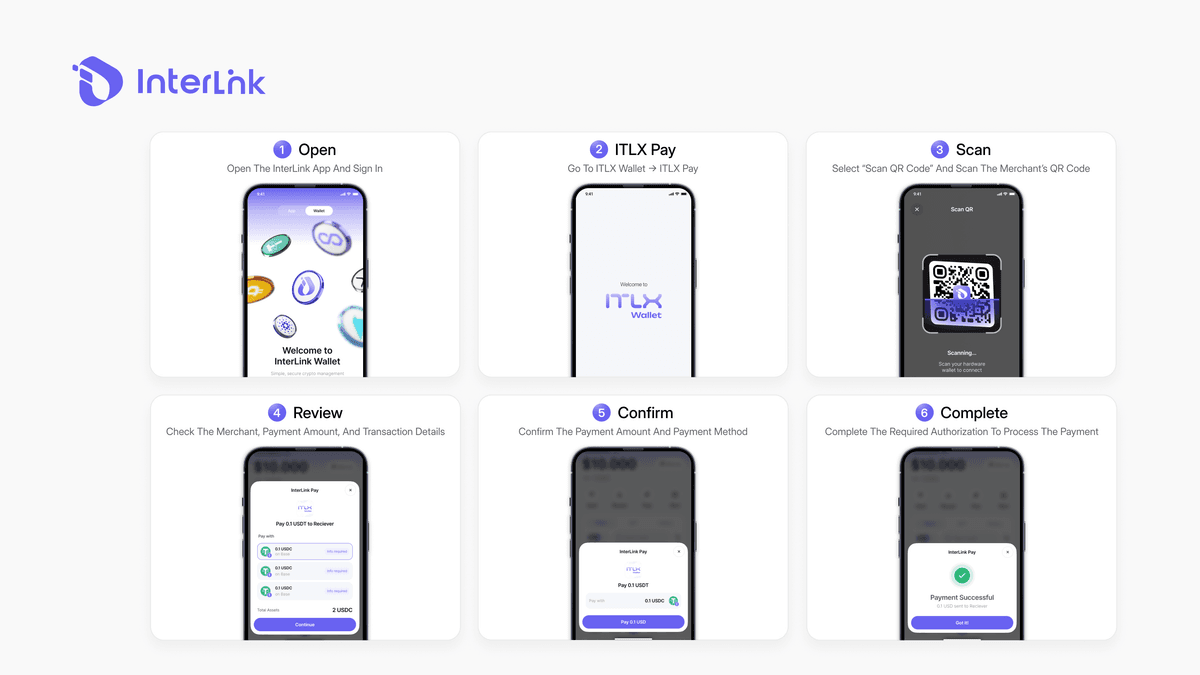
The basic InterLink QR code payments guide is straightforward. If QR payments are supported in your region and you have sufficient funds in your ITLX Wallet, you can follow these steps.
Prerequisites
Before you begin, you need a verified InterLink ID. Completing Proof of Personhood verification is a mandatory step because InterLink's payment features are identity-gated to ensure that only real, verified humans can access them. You also need to ensure your ITLX Wallet has enough supported digital assets to cover the payment.
Step-by-Step Guide
- Step 1 – Open the InterLink App: Launch the InterLink app and sign in to your account. Make sure your ITLX Wallet has enough supported digital assets to cover the payment.
- Step 2 – Open ITLX Pay: Go to the ITLX Wallet and select ITLX Pay to access the available payment features.
- Step 3 – Select "Scan QR Code": Choose "Scan QR Code" to activate the scanner and allow the app to use your phone's camera.
- Step 4 – Scan the merchant's QR code: Point your camera at the merchant's supported QR code. Wait for the payment details to appear and make sure the merchant information is correct.
- Step 5 – Confirm the payment amount: Review the payment amount, currency, and other transaction details shown in the app. Check everything carefully before approving the transaction.
- Step 6 – Complete the transaction: Confirm the payment using the required authorization method. Once the transaction is successfully processed, the payment is complete.
What Can You Pay For?
ITLX Pay is designed to support different types of real-world spending. However, the exact services available depend on the user's location and the third-party providers supporting the transaction.
Bills and Shopping
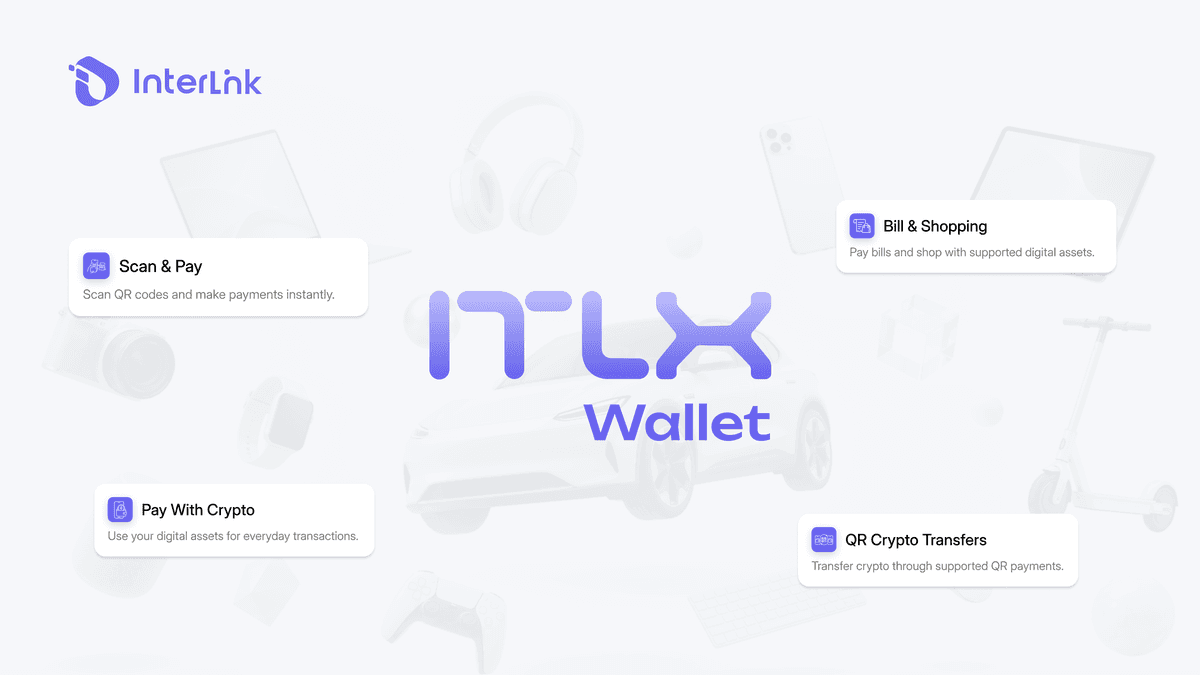
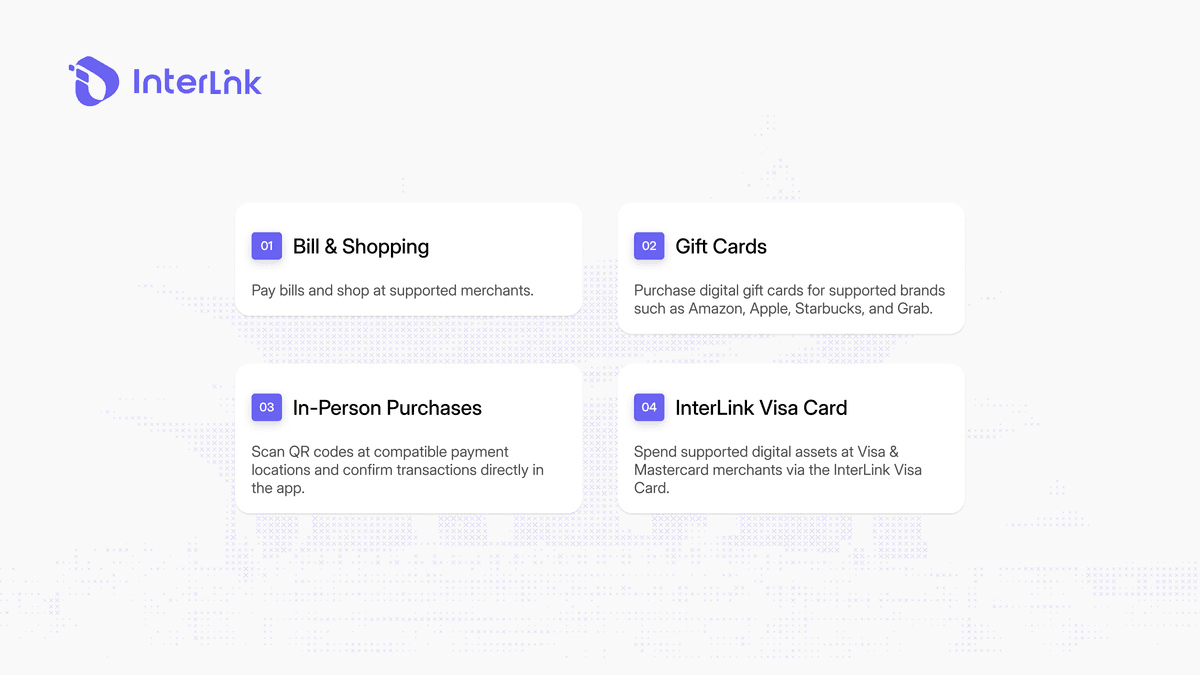
Users can use supported QR payment services to pay bills, shop at participating merchants, or transfer crypto through QR-based transactions. In supported regions, the system can work with national QR payment standards, allowing users to scan familiar payment codes without having to manually enter cryptocurrency addresses. This can make crypto spending more practical for everyday purchases while keeping the payment process inside the wallet experience.
Gift Cards and Digital Purchases
The ITLX Wallet also includes a gift card module that allows users to purchase digital gift cards for supported brands. Available options can include major brands such as Amazon, Apple, Starbucks, and Grab. Gift cards provide another way to use digital assets for everyday purchases without requiring users to make a separate manual conversion before purchasing a supported gift card.
In-Person Purchases
QR code payments can also be used for supported in-person and in-app purchases. The QR scanning function is designed for quick transactions, reducing the amount of information users need to enter manually. When a merchant supports a compatible QR payment method, users can scan the code, review the transaction details, and confirm the payment directly through the app.
InterLink Visa Card
The InterLink Visa Card provides another payment option for supported digital assets. Launched through a partnership with HPX, the card is designed to allow users to spend supported digital assets at Visa and Mastercard merchants where the service is available.
According to the provided InterLink product information, the card is intended for use across more than 50 million merchants in over 170 countries and is integrated with the ITLX Wallet. The card also supports integration with Apple Pay and Google Pay, providing additional options for mobile and contactless payments.
Actual availability and usage conditions can depend on the card provider, supported assets, merchant network, and user's region. Users should verify the latest card features and supported regions through official InterLink channels.
Payment Partners and Coverage
InterLink's payment capabilities are enabled through integrations with third-party providers rather than a payment network operated entirely by InterLink. These partnerships help provide different payment functions, including QR payments, card services, and digital payment compatibility.
QR Payment Integration
Third-party QR payment integrations allow ITLX Pay to connect with supported QR payment networks. This can make it possible for users to scan QR codes that are already familiar in their local payment environment.
Current supported regions and standards include markets such as Nigeria, Vietnam, and Brazil, with support for national QR standards including ThaiQR and the upcoming VietQR protocols. However, QR compatibility does not automatically mean that every QR code can be used with ITLX Pay. The QR standard, merchant, payment provider, and supported region all need to be compatible with the service.
Card and Digital Payment Support
Card-based and digital payment capabilities can extend the ways users spend supported digital assets beyond QR transactions. The InterLink Visa Card, for example, provides access to participating Visa and Mastercard merchant networks through its partnership with HPX.
WalletConnect Pay can also expand payment compatibility by connecting supported wallet users with participating applications and payment experiences. These integrations are separate from InterLink operating a payment rail itself. Instead, they allow the wallet to interact with external payment infrastructure provided by its partners.
Important Note on Availability
InterLink does not operate its own payment rails directly. Payment processing, crypto-to-fiat conversion, and settlement are handled through third-party providers, so availability depends on their supported markets, payment networks, and local conditions.
This means not all countries are supported, payment methods may vary by region, merchant and service availability may differ, and coverage may expand as new partnerships are added. Users should check the available payment features in the InterLink app before making a transaction.
Benefits of ITLX Pay
ITLX Pay is designed to simplify the process of using digital assets for real-world transactions. Key benefits include instant crypto-to-fiat conversion during supported transactions, simplified spending without a separate off-ramp process, and direct access through the ITLX Wallet ecosystem.
Supported payment options can include assets such as USDT, USDC, and Ethereum depending on the specific service. Gift card support allows users to purchase supported gift cards without leaving the wallet. Integrations such as WalletConnect Pay can provide additional ways for users to interact with supported payment services. Together, these features aim to make crypto spending more practical by connecting digital assets with payment methods that users already understand.
Conclusion
InterLink Payments provides a simple way to use supported digital assets for everyday payments through QR codes, gift cards, and other payment options. With ITLX Pay, users can make supported payments while crypto-to-fiat conversion is handled during the transaction. Payment availability depends on third-party providers and supported regions.
Disclaimer: This article from InterLink Labs is for informational purposes only and does not guarantee payment availability in every country or region. Always verify the latest payment features and supported services through InterLink's official channels.

